An engineering video can be completely accurate and still be difficult to learn from — the equations, the diagram and the simulation can all be correct while the student finishes with only a vague sense of how the pieces connect.
The lecturer may explain the correct equations. The diagram may be technically correct. The simulation may behave correctly. The final answer may be right.
Yet the student may finish the video with only a vague understanding of how the pieces connect.
One reason is that multimedia creates another engineering-education problem: the learner has to decide what to look at, what to listen to and what to think about at the same time.
This becomes especially important in engineering, where a single explanation may involve:
- A physical component
- An engineering diagram
- An equation
- A graph
- Animation
- Numerical calculation
- Software or simulation
I have found that technical material becomes harder to follow when too many of these elements compete for attention simultaneously. A clearer step-by-step visual explanation makes it easier to see the relationship being explained.
That observation aligns with a much larger body of multimedia-learning research.
“The right information should become available at the right moment, in the right form — not simply fewer ideas, but better-timed ones.”
Multimedia learning is not simply using many media
The word "multimedia" can easily be interpreted as: use video, narration, animation, diagrams, text and music together. That is not the educational objective.
In multimedia-learning research, the important issue is how learners process and integrate verbal and visual information.
The Cognitive Theory of Multimedia Learning is built around several core assumptions:
- People process verbal and pictorial information through partly distinct channels
- Those channels have limited processing capacity
- Meaningful learning requires learners to select, organize and integrate relevant information
Contemporary multimedia-learning research therefore focuses heavily on how instructional material can reduce unnecessary processing and help learners concentrate on essential relationships — the same limited-capacity idea covered in more depth in cognitive load in engineering education.
That is particularly relevant for engineering.
Start with the engineering relationship
Before deciding which animation to use, where the camera should appear, or what graphics should move, ask:
“What engineering relationship should the learner understand after this section?”
Suppose the lesson concerns beam bending. The learning objective might be: understand how applied bending moment, section geometry and distance from the neutral axis influence bending stress.
Now the media can support that relationship. The video might show the physical beam, the loading, the cross-section, the relevant variables, the equation, and the resulting stress distribution.
Each representation has a purpose.
The video should not start with: how many graphics can we fit onto the screen?
It should start with: what should the learner look at right now?
This may be one of the most useful questions in engineering multimedia design.
Imagine the lecturer says: "Consider the reaction force at point A." What should be visually dominant at that moment?
Probably point A and its reaction force.
Not the lecturer's face, all three equations, the whole solution, a logo animation, or unrelated text.
A well-designed engineering video deliberately controls attention. The screen should change as the reasoning changes.
Remove information that does not contribute to learning
The coherence principle in multimedia learning suggests that unnecessary words, pictures and sounds can interfere with learning rather than improve it.
This is an important lesson for engineering videos because technical content already places substantial demands on learners.
Unnecessary elements may include:
- Decorative background animations
- Irrelevant machine footage
- Background music
- Unnecessary icons
- Complicated transitions
- Equations that are not being used
This does not mean engineering videos must look boring. It means visual design should serve the explanation.
Every element on the engineering screen should earn its place.
Signaling helps direct attention
Engineering diagrams can contain many relevant features. A free-body diagram may include support reactions, applied forces, moments, dimensions and axes.
The learner may not immediately know which feature the lecturer is discussing. Signaling provides cues. Possible techniques include:
- Temporarily highlighting a force
- Changing the emphasis of a line
- Circling a variable
- Revealing one component at a time
- Using an arrow to direct attention
Research on signaling in multimedia learning supports the use of cues that highlight the organization or essential elements of instructional material.
The emphasis should remain selective. If every item is highlighted, flashing and coloured, the cue loses its meaning.
Put related explanations near the diagrams they explain
Consider an engineering schematic with labels A, B, C and D, where the corresponding definitions sit in a table far away. The learner must repeatedly search: diagram, then table, then diagram again. That consumes attention.
The spatial-contiguity principle suggests that related text and graphics are often easier to integrate when they are physically close rather than unnecessarily separated.
For engineering videos, this can mean placing a variable near its force arrow, locating a short component label beside the component, or positioning an equation close to the diagram it describes.
The goal is not to cover the engineering diagram in text. It is to reduce unnecessary searching.
Explain dynamic behaviour while it happens
Timing matters too.
Suppose a CNC animation shows rapid approach, cutting move, tool retract and return. Then, after the animation ends, the lecturer explains what happened. The learner now has to reconstruct the movement from memory.
A stronger approach is often to coordinate the explanation with the event — "here the tool retracts along Z" — while the relevant movement occurs.
This reflects the temporal-contiguity principle: corresponding visual and verbal information should generally be coordinated in time where doing so supports integration.
This is particularly important for dynamic engineering processes such as machine motion, engine cycles, fluid movement, mechanism operation and vibration.
Segment complex engineering explanations
Some engineering systems contain too many interacting parts to explain effectively in one uninterrupted presentation.
Consider a thermodynamic cycle. A beginner may need to understand components, fluid direction, state changes, heat transfer, work and thermodynamic diagrams.
Explaining everything at once can make it difficult to form a coherent mental model.
The segmenting principle supports breaking complex multimedia into learner-manageable sections. A better sequence might be:
- Segment 1 — identify the main components
- Segment 2 — follow one process
- Segment 3 — add the next process
- Segment 4 — connect all components
- Segment 5 — map the physical cycle onto the thermodynamic diagram
The whole system still matters. It is simply assembled progressively.
Video length is not the right target
A popular rule says educational videos should always be very short. That is too crude for complex engineering topics.
A 20-minute explanation may contain several logical engineering sections. A five-minute video may still overwhelm learners if it moves too quickly.
Recent work on instructional-video segmentation reinforces the distinction between duration and meaningful segmentation.
A better design question is:
“Can learners control the pace at meaningful conceptual boundaries?”
A longer video divided into clear sections can be more usable than a short video delivered as one dense stream.
Pre-train important components
Before explaining a complex system, students may benefit from learning its key parts first. This is the pre-training principle.
Suppose the video teaches vibration-spectrum interpretation. Before analysing a complete spectrum, establish frequency, amplitude, rotational speed, and what 1× rotational frequency means.
Now the full example contains fewer completely unfamiliar elements.
The Cambridge Handbook of Multimedia Learning identifies pre-training as one way to manage essential processing by ensuring learners know the names and basic characteristics of important components before they have to understand how those components interact.
A useful engineering principle is: introduce the important parts before expecting novices to understand the complete system.
Equations should appear when the reasoning needs them
Engineering videos often animate equations because animation looks professional. But equation movement does not automatically improve understanding.
Suppose the lesson introduces σ = My / I. The equation could appear immediately. Or the explanation could build toward it:
Physical beam → load creates bending moment → cross-section → distance from neutral axis → section property → equation
Now the symbols have physical references. The equation enters the lesson when the learner has a reason to understand it — very different from simply placing the formula on the screen.
Connect mathematical symbols to physical meaning
When introducing an equation, avoid leaving learners to decode variables from memory.
For example: highlight M in the equation. Simultaneously highlight the bending moment in the mechanical diagram. Then highlight y, and show its physical location on the cross-section.
The learner is now connecting symbol to physical quantity.
This is one of the most valuable things multimedia can do in engineering education.
Narration and dense on-screen text can compete
One common video design is: the lecturer narrates, an identical paragraph appears on screen, and an engineering diagram is also visible.
The learner may now be trying to read the paragraph while listening to the same words and interpreting the diagram.
Instructional-video guidance based on multimedia-learning research identifies redundancy and modality as important design considerations.
For many engineering explanations, it is better to use narration plus a relevant technical visual, rather than narration plus a full duplicate paragraph plus the relevant technical visual.
But this needs an important qualification.
Captions still matter
Avoiding unnecessary redundant text does not mean removing accessibility. Captions are valuable for:
- Deaf or hard-of-hearing learners
- Learners studying in noisy environments
- Students working in a second language
- Reviewing unfamiliar technical terminology
So the principle should not be "no captions." It should be: do not design the main learning screen around dense duplicate text when the learner also needs to inspect complex engineering graphics.
Captions can remain available as an accessibility and learner-control feature.
Does the instructor need to be visible?
Not throughout every technical explanation.
If the instructor's face occupies a large part of the screen while the learner needs to study a detailed diagram, equation or simulation, the visual channel may be better used for the technical representation.
This does not mean instructor presence has no value. Showing the instructor can be useful when introducing the lesson, demonstrating a physical task, pointing to machine components, modelling tool handling, or summarizing.
The stronger principle is: show the instructor when the instructor's visible action contributes to the learning task. Do not include a talking head simply because instructional videos are expected to have one.
Animate the engineering process, not the presentation
Animation is powerful when the engineering phenomenon itself is dynamic.
Useful animation: piston movement, valve timing, CNC toolpath, fluid flow, mechanism motion, vibration mode.
Less useful animation: spinning equations, flying titles, decorative gear icons, moving backgrounds.
The difference is simple. One reveals behaviour. The other decorates the video. Animate what changes physically.
Multimedia can connect engineering representations
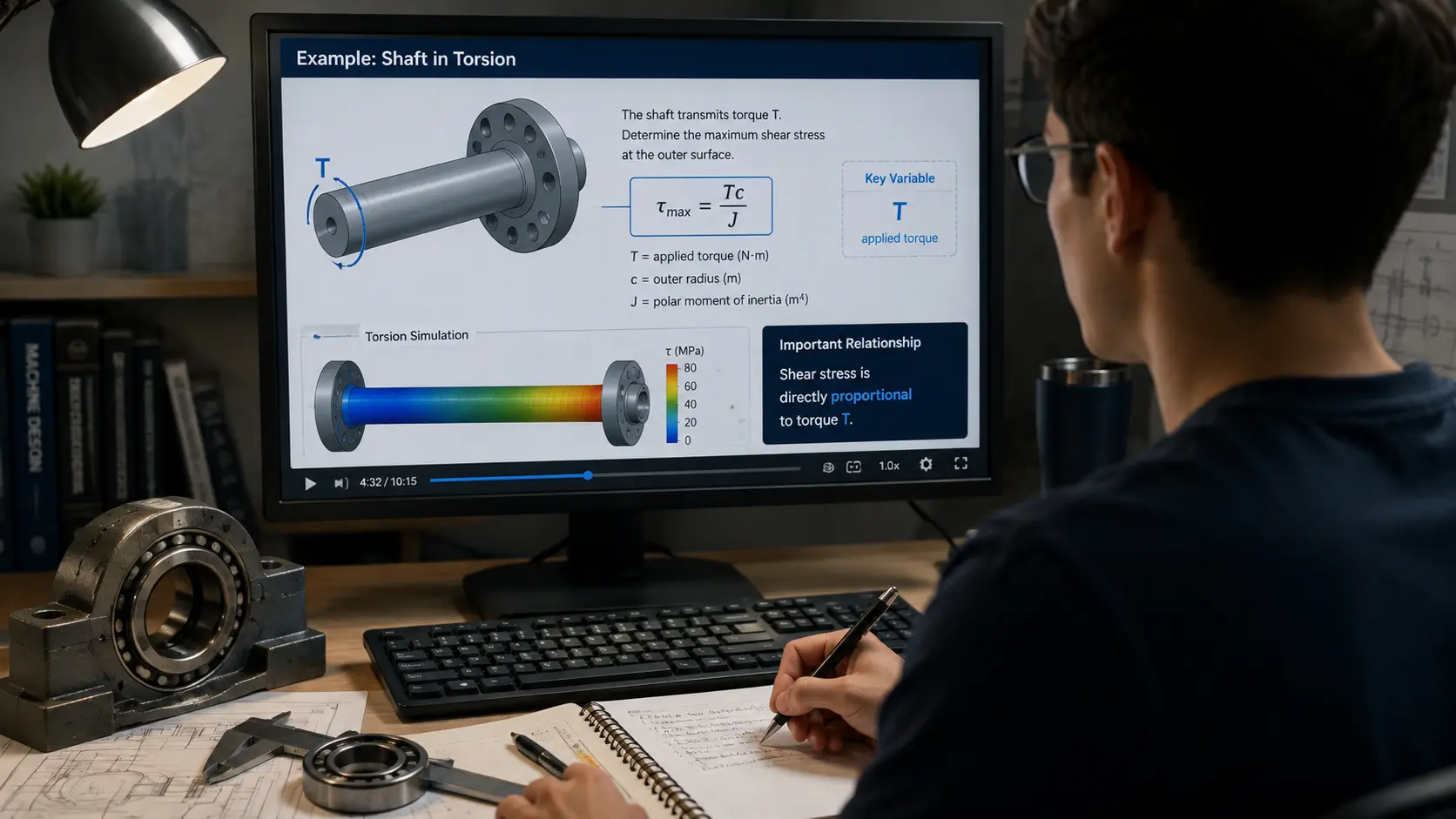
Mechanical engineering knowledge appears in many forms. Consider a shaft. A learner may encounter:
Physical shaft → loading diagram → free-body diagram → equation → graph or simulation → engineering decision
A strong video can explicitly guide learners between those representations — showing the physical shaft, fading into the simplified free-body diagram, introducing the relevant load, bringing in the equation, then returning to the physical system to explain what the calculated result means.
That transition is educationally valuable. As with the physical build and simulate-and-verify pattern discussed in simulation in engineering education, the key is not showing every representation simultaneously. It is showing how one representation becomes another.
Worked-example videos should explain decisions
Many engineering videos solve textbook problems. A lecturer writes the formula, the substitution and the answer. Students may follow every step.
Then they encounter a different problem and do not know where to begin.
Why? The worked video showed what the expert did, without sufficiently explaining why the expert chose to do it.
A better worked example should explicitly answer:
- Why is this the relevant equation?
- Why is this assumption acceptable?
- Why choose this coordinate system?
- What information is irrelevant?
- How can we check whether the answer makes physical sense?
That develops problem-solving structure rather than imitation.
Students eventually need less video support
Worked examples are particularly useful while learners are unfamiliar with a problem structure. But support should gradually fade. An instructional sequence could use:
- Video 1 — complete explanation
- Video 2 — pause before major decisions
- Video 3 — learner completes several steps
- Video 4 — only hints or solution review
- Independent problem — no video support
This connects multimedia design to the expertise-reversal and guidance-fading ideas discussed in cognitive-load research, and to the same fade-the-scaffolding logic behind why engineering students struggle to transfer classroom knowledge into practical work.
The goal is not to produce students who are excellent at following engineering videos. The goal is to produce students who can eventually reason without them.
Pause points should require thinking
Video naturally encourages passive viewing. Students may watch an expert solve a problem and experience a strong feeling of familiarity. That is not necessarily the same as being able to solve it themselves.
Good multimedia videos can interrupt passivity. For example:
- Pause. Which force should appear on the free-body diagram next?
- Before the simulation runs, predict whether temperature should increase or decrease.
- Which direction should the CNC tool move after this command?
Now the student must produce an answer before seeing one.
Instructional-video research includes generative activities — such as prompting learners to explain, retrieve or generate information — as an important complement to multimedia presentation.
Prediction is especially valuable in engineering videos
Engineering deals with physical systems. That makes prediction particularly useful.
- Before showing beam deformation: which direction should it bend?
- Before showing a heat-transfer simulation: where should the highest temperature occur?
- Before revealing a vibration spectrum: which frequency region would you examine first?
Then show the result. The discrepancy between prediction and observation becomes an opportunity for reasoning.
The video is no longer merely presenting information. It is testing the learner's mental model.
Multimedia can also create false fluency
A beautifully explained video can make a difficult engineering problem appear obvious. Every step arrives at exactly the right moment. The lecturer never hesitates. The diagram is perfectly drawn. The answer follows logically.
A student watching may think: I could do that.
Then independent work begins. The support disappears. Now the problem feels much harder.
This is why video-based engineering instruction needs retrieval, prediction, independent problems, and gradually faded guidance.
“Smooth explanation should not be confused with independent mastery.”
My perspective from engineering learning
In engineering learning, I have found that too much simultaneous information can make a lesson harder even when each individual element is understandable.
A diagram may make sense. An equation may make sense. A simulation may make sense. But if all of them are changing while narration and text compete for attention, understanding the relationship between them becomes harder.
Step-by-step explanation can make that relationship much clearer.
That does not mean engineering content should permanently be broken into tiny isolated pieces. Students eventually need to integrate the whole system.
The important issue is sequencing:
Focus attention → build relationships → connect representations → increase complexity → reason independently
The Engineering Multimedia Design Check
Before publishing an engineering-learning video, ask ten questions.
1. What engineering relationship must the learner understand?
If this is unclear, additional media will not fix the lesson.
2. What should the learner be looking at right now?
Make the relevant representation visually dominant.
3. What can be removed?
Look for decoration, irrelevant text, unnecessary animation and visual clutter.
4. Are related visuals and explanations integrated?
Reduce unnecessary searching between diagrams, labels, equations and definitions.
5. Is the pace manageable?
Complex reasoning may need pause points, segments and learner control.
6. Is pre-training needed?
Introduce unfamiliar components, terminology and symbols before showing the entire system.
7. Is narration unnecessarily duplicated by dense text?
Use on-screen text selectively while preserving caption accessibility.
8. Does the learner have to think?
Include prediction, retrieval, explanation and partial problem solving.
9. Can the learner control the pace?
Students should be able to pause, replay and revisit meaningful sections.
10. Does support eventually fade?
Ask whether learners will later solve a related engineering problem without the video. The final goal is independent reasoning.
Redesigning a poor engineering video
Imagine a video explaining a simply supported beam.
Poor design: the screen contains a lecturer webcam, the full problem statement, a complete free-body diagram, three equations, a full calculation and decorative animation. The lecturer begins reading everything. The student can look almost anywhere.
Better sequence: start with the physical/engineering problem. Then:
- Step 1 — highlight the supports
- Step 2 — identify applied loads
- Step 3 — ask the student to predict reactions
- Step 4 — construct the free-body diagram
- Step 5 — introduce the relevant equilibrium equation
- Step 6 — solve one stage
- Step 7 — pause before the learner completes the next stage
- Step 8 — return to the physical beam and interpret the result
The amount of engineering content has not necessarily decreased. The timing and coordination have improved. That is multimedia design.
What this means for mechanical-engineering education
Multimedia video can be especially valuable in mechanical engineering because the discipline constantly moves among physical systems, mathematics, diagrams, dynamic behaviour, simulation and measurement.
Good video design can make those transitions visible. For example:
CNC: G-code → coordinate → tool movement → machined geometry
Thermodynamics: physical components → state points → process → property diagram
Machine dynamics: physical rotating system → motion → signal → frequency spectrum
Mechanics: component → loads → free-body diagram → equation → stress/deflection
The CNC chain is exactly why teaching CNC effectively depends on connecting the theory to hands-on practice, and why verifying generated G-code and toolpaths matters before a video's animation is trusted as a stand-in for the physical machine.
This is where multimedia has genuine value. Not because engineering education needs more screens. Because video can help students see relationships that are difficult to coordinate through static text alone.
Key takeaway
Engineering videos should not be designed by asking: how much information can we include?
They should be designed around: what should the learner understand at this moment?
- Use diagrams when spatial relationships matter
- Use animation when physical change matters
- Use narration to guide interpretation
- Use signaling to direct attention
- Use segmentation when the system contains too many unfamiliar interacting elements
- Use pre-training before introducing the entire system
- Use captions for accessibility without turning the screen into a duplicate transcript
- Use pause points and prediction so students have to think
- Then reduce the support
“A good engineering video should ultimately help the learner move from watching an expert think to thinking like an engineer independently.”
That is a much more useful design goal than simply producing a polished video.
References and further reading
- Mayer, R. E. — Multimedia Learning / Cognitive Theory of Multimedia Learning. The central theoretical foundation for understanding how verbal and visual information can be coordinated to support learning.
- The Cambridge Handbook of Multimedia Learning. Useful for principles including coherence, signaling, spatial contiguity, temporal contiguity, segmenting and pre-training, covering how instructional design can reduce extraneous processing and manage essential processing.
- Fiorella & Mayer — Evidence-based principles for how to design instructional video. A useful synthesis covering multimedia, coherence, signaling, redundancy, contiguity, segmenting, pre-training, modality, personalization and generative activity.
- Recent instructional-video research on segmentation and learner control. Useful for distinguishing meaningful segmentation from arbitrary short-video rules.