
Many businesses start their digital journey with a website. However, a website alone may not solve the deeper problems inside daily operations. This is where business automation software becomes important because it helps businesses save time, reduce errors, and manage work more clearly.
A website helps people find your business, understand your services, and contact you online. However, a website alone may not solve the deeper problems inside your daily operations.
For example, your business may still depend on manual records, repeated WhatsApp messages, scattered Excel sheets, paper forms, slow approvals, and untracked customer requests.
This is where business automation software becomes important. This is also known as workflow automation, because it helps repeated business processes move from one step to another with less manual work.
Instead of only using technology to look professional online, businesses can use custom software to work better, save time, reduce errors, and manage operations more clearly.
In simple terms, the next step after web design is not just a better-looking website. It is a smarter digital system that supports how your business works every day.
What Is Business Automation Software?
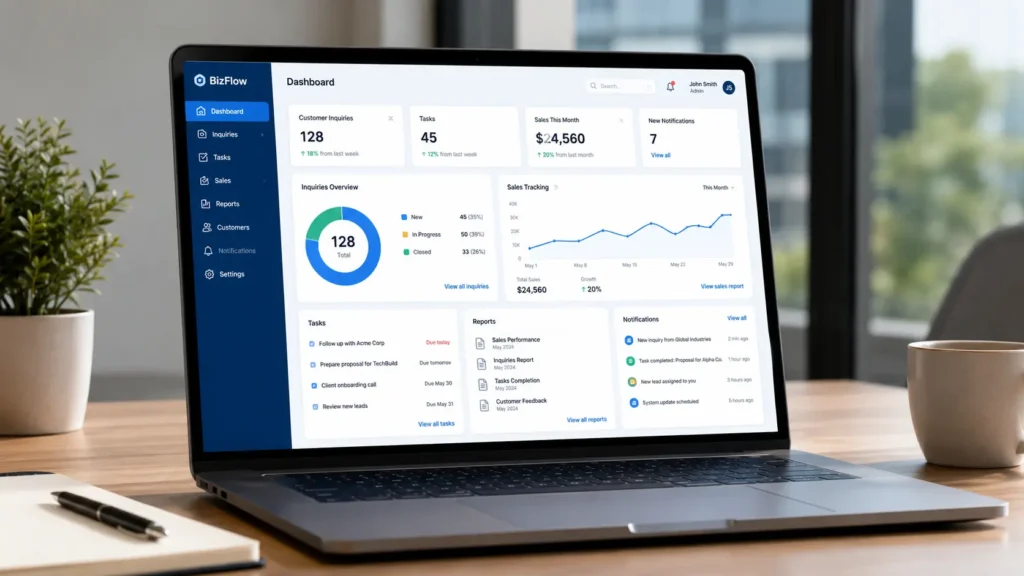
Business automation software is a digital system that helps a business handle repeated tasks with less manual effort.
It can collect information, send alerts, assign tasks, generate reports, track progress, and organize records in one place.
Instead of doing the same task many times by hand, the system helps you do it faster and more accurately.
For example, a business can use automation software to:
- Track customer inquiries
- Manage staff tasks
- Generate invoices
- Record stock movement
- Monitor sales
- Send reminders
- Store client records
- Handle approvals
- Create reports
- Track project progress
As a result, the business becomes more organized and easier to manage.
Why Web Design Alone Is Not Enough
A website brings people to your business. Business automation software helps you serve them better
However, many businesses stop there.
They invest in a website but continue running their internal operations manually. Because of this, they still struggle with delays, confusion, poor follow-up, and missing information.
For example, a website may bring in customer inquiries. But if there is no system to track those inquiries, some leads may be forgotten.
A website may display your services. However, if your team has no proper task management system, service delivery may still be slow.
A website may make your business look modern. Still, if your reports are done manually every month, decision-making remains difficult.
This is why business owners should think beyond web design.
A website brings people to your business. Business automation software helps you serve them better.
Common Business Operations That Can Be Automated

Every business has repeated tasks. Some are small, while others take hours every week.
When these tasks are automated, the team gets more time to focus on important work.
Here are common operations that can be automated.
1. Customer Inquiries
Many businesses receive inquiries through websites, phone calls, WhatsApp, email, and social media.
Without a proper system, it becomes easy to lose track of who contacted you, what they asked, and whether someone followed up.
A custom system can help you:
- Capture inquiries from your website
- Assign leads to team members
- Track follow-up status
- Store customer details
- Send automatic notifications
- Show pending requests on a dashboard
This makes customer communication more organized.
2. Sales and Lead Tracking
A business needs to know where leads are coming from and which ones are converting.
Instead of using scattered notes, a simple sales tracking system can show:
- New leads
- Follow-up status
- Closed deals
- Lost opportunities
- Monthly sales trends
- Team performance
As a result, business owners can make better decisions based on real data.
3. Staff Task Management
Many teams still assign tasks through verbal instructions or WhatsApp messages.
This may work for a small team, but it becomes confusing as the business grows.
A task management system can help you:
- Assign tasks
- Set deadlines
- Track progress
- Mark completed work
- Share updates
- Monitor team performance
Therefore, everyone knows what they are supposed to do.
4. Inventory and Stock Control
Stock management can become difficult when records are handled manually.
A custom inventory system can help track:
- Products received
- Products sold
- Remaining stock
- Low-stock alerts
- Supplier records
- Stock movement history
This reduces guesswork and helps prevent losses.
5. Reports and Dashboards
Reports are important, but creating them manually can take a lot of time.
With automation, a business can generate reports from data already stored in the system.
For example, a dashboard can show:
- Total sales
- Pending tasks
- Customer inquiries
- Website leads
- Stock levels
- Monthly performance
- Project progress
In addition, dashboards help business owners see what is happening without waiting for long reports.
Benefits of Business Automation Software
Business automation software helps you collect and view important information in one place. Automation is not only for big companies. Small and medium businesses can also benefit from simple custom systems.
The goal is not to replace people. Instead, the goal is to help people work better.
Here are the main benefits.
It Saves Time
Repeated tasks can waste many hours every week.
For example, entering the same customer details in different places takes time. With automation, the information can be collected once and used across the system.
This gives your team more time to focus on service delivery, sales, and customer support.
It Reduces Human Error
Manual work often leads to mistakes.
A wrong figure in a report, a forgotten follow-up, or a misplaced record can affect business performance.
However, a digital system reduces these errors by keeping information organized and easier to access.
It Improves Customer Service
Customers want fast and clear communication.
When your business has a system for tracking inquiries, complaints, and follow-ups, customers are less likely to be ignored.
As a result, your business becomes more reliable.
It Supports Better Decisions
Good decisions need good information.
If your business data is scattered, it becomes hard to know what is working and what needs improvement.
Business automation software helps you collect and view important information in one place.
It Helps the Business Grow
As a business grows, manual systems become harder to manage.
A custom system can grow with the business. You can start with simple features and add more later.
This makes automation a long-term investment, not just a short-term tool.
Examples of Custom Software for Business Automation
Custom software can be designed based on the needs of a specific business.
That is one of its biggest advantages.
Unlike general tools, custom software is built around your workflow, your team, your customers, and your goals.
Here are practical examples.
Customer Management System
This system helps a business manage customer records, inquiries, follow-ups, and communication history.
It is useful for service businesses, consultants, agencies, clinics, training firms, and sales teams.
Booking and Appointment System
A booking system allows customers to schedule services online.
It can include reminders, availability checks, service selection, and appointment records.
This is useful for consultants, salons, clinics, trainers, and professional service providers.
Inventory Management System
This system helps businesses track stock movement, suppliers, sales, and low-stock items.
It is useful for shops, hardware stores, pharmacies, warehouses, and small distributors.
Project Management Dashboard
A project dashboard helps teams track tasks, deadlines, project status, and team responsibilities.
It is useful for construction teams, digital agencies, consultants, engineers, and service providers.
Digital Reporting System
A reporting system helps staff submit reports online instead of using paper forms or long email threads.
For example, it can be used for safety reports, field reports, inspection reports, incident reports, or daily work updates.
When Does Your Business Need Automation?
You may need business automation software if your team repeats the same tasks every day. Not every business needs a complex system immediately.
However, there are signs that your business is ready for automation.
You may need business automation software if:
- You repeat the same tasks every day
- You lose customer inquiries
- Your reports take too long to prepare
- Your team depends too much on WhatsApp instructions
- You struggle to track sales or leads
- Your records are scattered in different places
- You use too many Excel sheets
- You cannot easily see business performance
- Your staff waste time on manual admin work
- You want to grow but your current system feels disorganized
If several of these problems sound familiar, automation can help.
The best place to start is with one important problem. After solving it, you can improve other areas step by step.
Why Custom Software Is Better Than a One-Size-Fits-All Tool
There are many ready-made tools online. Some are good and affordable.
However, they may not always fit how your business works.
A ready-made tool may have features you do not need. It may also miss important features that matter to your workflow.
Custom software is different because it is designed around your business.
It can match your:
- Services
- Team structure
- Approval process
- Customer journey
- Reporting needs
- Branding
- Growth plans
This makes the system easier to use and more relevant.
However, custom software should not be complicated. A good system should be simple, practical, and easy for your team to understand.
How Business Automation Connects With Web Design
Web design and automation should not be treated as separate things.
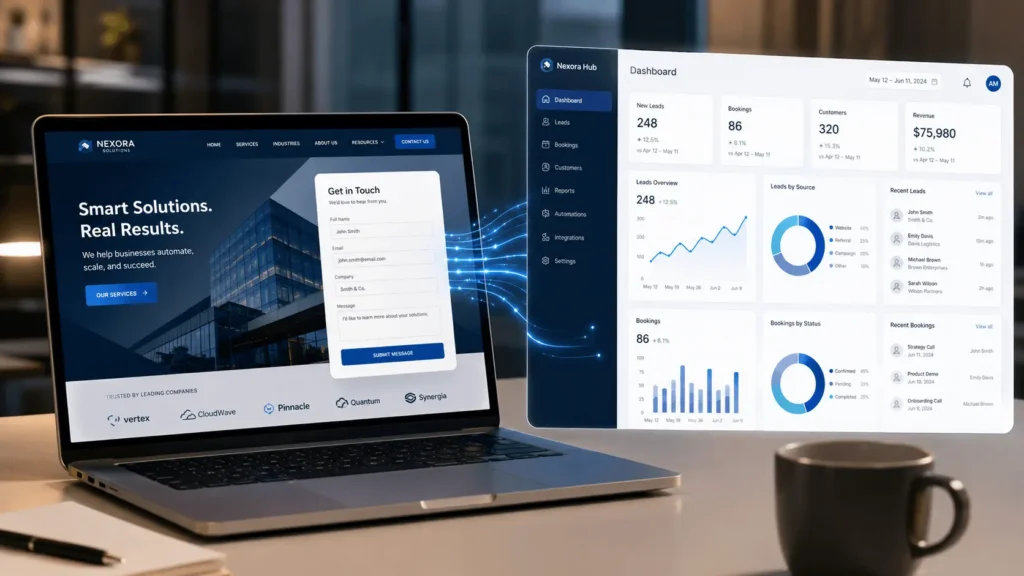
A website can attract visitors, while automation can help the business manage what happens after someone takes action.
For example:
- A contact form can send customer details to a dashboard.
- A quote request can create a new lead automatically.
- A booking page can update your calendar.
- A payment form can generate a receipt.
- A customer complaint form can create a support ticket.
- A job application form can organize applicants in one system.
This is where web design becomes more powerful.
Instead of having a website that only displays information, your website becomes part of your business operations.
That is the real value of combining web design with business automation software.
The Role of AI in Business Automation
AI is making automation even more powerful.
Today, businesses can use AI to support customer service, content creation, data analysis, reporting, and decision-making.
For example, AI can help:
- Answer common customer questions
- Summarize reports
- Suggest responses to inquiries
- Analyze customer feedback
- Organize data
- Support chatbot conversations
- Help teams work faster
However, AI should be used wisely.
It should support the business, not confuse customers or replace human judgment where personal attention is needed.
The best approach is to combine AI with clear business processes. That way, the technology becomes useful, practical, and easy to manage.
How to Start Automating Your Business Operations
You do not need to automate everything at once.
Instead, start small and focus on the areas that waste the most time or cause the most confusion.
Here is a simple starting process:
- Identify repeated tasks
- List the biggest problems in your workflow
- Choose one process to improve first
- Define what the system should do
- Decide who will use the system
- Start with simple features
- Test the system with real users
- Improve it over time
For example, if your biggest problem is losing customer inquiries, start with a lead tracking system.
If reporting takes too long, start with a digital reporting system.
If stock records are confusing, start with inventory management.
Over time, these small improvements can create a more organized and efficient business.
Mistakes to Avoid When Automating Your Business
Automation can improve your business, but only when it is done properly.
Here are common mistakes to avoid.
Automating Without Understanding the Problem
Do not build software just because it sounds modern.
First, understand the real problem. Then, build a system that solves it.
Making the System Too Complicated
A system should make work easier, not harder.
If your team finds it difficult to use, they may avoid it. Therefore, simplicity is very important.
Ignoring the People Who Will Use It
The people who use the system every day should be involved early.
Their feedback helps create a system that matches real work, not just theory.
Forgetting About Training
Even a simple system needs proper introduction.
Train your team, explain the benefits, and give them time to adjust.
Failing to Improve the System
Business needs change over time.
Because of this, your software should be reviewed and improved as your business grows.
Final Thoughts
Web design is important, but it is only the beginning of digital transformation.
A good website helps people discover your business. However, business automation software helps your business operate better behind the scenes.
It can save time, reduce errors, improve customer service, support better decisions, and prepare your business for growth.
The best approach is to start with one clear problem. Then, build a simple digital system that solves it well.
As your business grows, you can add more features and automate more processes.
In the end, automation is not about replacing people. It is about helping people work smarter.
To understand how websites support business growth, you may also find these guides helpful:
- How Much Does It Cost to Build a Website in Kenya (2026 Guide)
- Do You Still Need a Website in 2026 in Kenya? Honest Truth
A good website helps people discover your business. However, business automation software helps your business operate better behind the scenes.
Ready to Automate Your Business Operations?
Harun Lucas helps businesses move beyond basic web design by building practical digital systems, custom software, AI-powered tools, and automation solutions.
Whether you need a business website, lead tracking system, reporting dashboard, customer management platform, or smarter digital workflow, the goal is simple: to help your business work better.
Visit Harun Lucas’ website to explore digital solutions, view his work, or contact him for a custom software system built around your business needs.
Frequently Asked Questions
Business automation software helps reduce manual work by using digital tools to manage tasks such as customer inquiries, follow-ups, reports, reminders, bookings, payments, records, and internal workflows.
A website is important, but businesses also need systems that help them work better. Automation tools can help track leads, manage customer data, generate reports, organize workflows, and reduce missed opportunities.
Businesses can automate customer follow-ups, appointment booking, quote requests, invoices, reports, inventory tracking, staff tasks, reminders, email responses, and lead management.
No. Small and medium-sized businesses can also use automation. A simple system for tracking leads, reminders, or customer inquiries can make a big difference.
Automation helps businesses respond faster, follow up on time, keep customer details organized, and avoid forgetting important requests. This can improve customer experience and increase conversions.
Yes. Harun Lucas focuses on practical digital systems, custom software, AI-powered tools, and automation solutions that help businesses work better.